BEAM on Mobile · Part II
Mob: the syntax
LiveView muscle memory, on a phone
Part I was why. This one is how — the syntax, and the reasoning behind every decision.
Last time, in one slide
- I was a mobile dev. Then I fell for Elixir.
- Wanted the whole BEAM on the phone — not a webview, not a bridge.
- The eureka: ship the BEAM as a NIF, drive native views from Elixir.
- "Mob is LiveView for native mobile."
No mobile background needed tonight. If you've written a LiveView and a GenServer, you already know Mob.
The bet
Make good decisions by stealing good ones.
- Copy LiveView, GenServer, OTP — unless mobile says otherwise.
- Bridge both ways: Elixir → mobile, and mobile → Elixir.
- Don't reinvent. Solve solved problems with the known-good answer.
And there's a side effect
Adopt the patterns everyone already knows…
…and Claude freaking loves this thing.
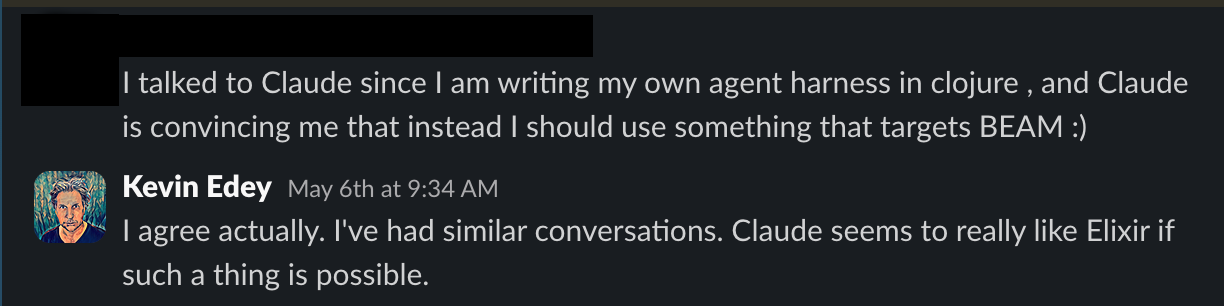
Familiar patterns = less to invent = an agent that's already fluent.
Let's make one
mix mob.new mobdemo
cd mobdemo && mix mob.install
mix mob.deploy        # → onto a real phone / simulator
One command scaffolds a working app: a home screen, a handful of example screens, an Ecto repo — all in Elixir.
It runs. It does the thing. Then we open it up.
Anatomy of a Screen
defmodule Mobdemo.DiceScreen do
  use Mob.Screen

  def mount(_params, _session, socket) do
    {:ok, Mob.Socket.assign(socket, :value, nil)}
  end

  def render(assigns) do
    # … a view tree …
  end

  def handle_info({:tap, :roll}, socket) do
    {:noreply, Mob.Socket.assign(socket, :value, :rand.uniform(6))}
  end
end
Squint. That's a LiveView. That's a GenServer.
You already know the API
| LiveView / GenServer | Mob | |
|---|---|---|
mount/3 | → | mount/3 |
render(assigns) | → | render(assigns) |
assign(socket, …) | → | Mob.Socket.assign(socket, …) |
handle_event/3 | → | handle_info/2 |
push_navigate | → | push_screen / pop_screen |
One row is different — handle_event → handle_info. We'll get to why.
Two ways to say the same thing
A screen is just a tree of components.
Write that tree however you like:
Same tree. Pick the one that fits your hands — or your robot's.
Sigil vs map
~MOB"""
<Scroll background={:background}>
  <Column padding={:space_lg}>
    <Text text="Roll!" text_size={:xl} />
    <Button
      text="Roll Dice"
      on_tap={{self(), :roll}} />
  </Column>
</Scroll>
"""
%{
  type: :scroll,
  props: %{background: :background},
  children: [
    %{type: :column, props: %{padding: :space_lg},
      children: [
        %{type: :text,
          props: %{text: "Roll!", text_size: :xl}},
        %{type: :button,
          props: %{text: "Roll Dice",
                   on_tap: {self(), :roll}}}
      ]}
  ]
}
The sigil compiles to the map. Identical tree, identical app.
Real screen: the home screen
def render(assigns) do
  ~MOB"""
  <Scroll background={:background}>
    <Column padding={:space_lg}>
      <Image src={logo_src(assigns.theme)} width={120} height={120} />
      <Text text="Mobdemo" text_size={:xl} text_color={:on_surface} />
      <Text text="BEAM running on device" text_color={:primary} />
      <Spacer size={40} />
      {nav_button("Roll Dice", :open_dice)}
      {nav_button("Text Input", :open_text)}
    </Column>
  </Scroll>
  """
end
HTML-ish, but it's Elixir all the way down — {nav_button(...)} is a function call.
The state loop: tap → message → re-render
# in render: the button announces who to message, and with what tag
%{type: :button,
  props: %{text: "Roll again", background: :primary,
           on_tap: {self(), :roll}}}

# the tap arrives as a plain message
def handle_info({:tap, :roll}, socket) do
  value = :rand.uniform(6)
  {:noreply, Mob.Socket.assign(socket, :value, value)}
end
- Tap →
{:tap, :roll}lands inhandle_info assignthe new state → Mob re-renders the native view- Exactly the LiveView loop. No diffing in your code.
Why handle_info, not handle_event?
on_tap:    {self(), :roll}              → handle_info({:tap, :roll}, socket)
on_change: {self(), :text_changed}      → handle_info({:change, :text_changed, value}, socket)
- Everything a screen receives is just a message to its pid.
handle_info/2already handles messages — it's the general primitive.handle_eventis a specialization LiveView adds. Mob didn't need it.
The general pattern was already enough. Fewer concepts, not more.
While we're on the topic…
Catch-events fits native.
Callbacks don't.
BEAM — catch events
- Native is synchronous — it emits and receives events.
- The BEAM lives on messages and mailboxes.
- Same shape on both sides — they just fit.
React Native — callbacks
- JS was sync, then bolted on async to chase performance.
- Callbacks are the kludge a sync language reinvents itself with.
- A model grafted onto native's — not matched to it.
The two models just don't fit well together — IMO.
Navigation is a layout, too
A screen lays out components — the app lays out navigation.
use Mob.App

# each platform gets its native shell
def navigation(:ios),     do: tab_bar([stack(:home,   root: HomeScreen),
                                       stack(:browse, root: BrowseScreen)])
def navigation(:android), do: drawer([stack(:home,   root: HomeScreen),
                                      stack(:browse, root: BrowseScreen)])
def navigation(_),        do: stack(:main, root: HomeScreen)
tab_bar→ iOS tab bar · Android bottom navdrawer→ native Android side drawer- Per-platform — and all just maps. Navigation is data too.
Moving within it: push & pop
# go deeper
def handle_info({:tap, :open_dice}, socket) do
  {:noreply, Mob.Socket.push_screen(socket, Mobdemo.DiceScreen)}
end

# go back
def handle_info({:tap, :back}, socket) do
  {:noreply, Mob.Socket.pop_screen(socket)}
end
- Web is a tree of URLs. Mobile is a stack of screens.
- So you
push/popthe stack — held in a GenServer, driven by a message. - Hardware back / back-swipe pops it for free.
"I'll never do apps…"
"…I just like Ecto too much to give it up."
We gotchu, bruv.
defmodule Mobdemo.Repo do
  use Ecto.Repo, otp_app: :mobdemo,
                 adapter: Ecto.Adapters.SQLite3   # ← right there on the phone
end

Repo.insert!(%Round{user_choice: "rock", result: "win"})
Repo.all(from r in Round, order_by: [desc: r.inserted_at])
Real schemas, migrations, from — on SQLite in the app's private storage. Survives restarts and updates.
"No way that works on a phone"
"It's a server. It'll be fat, heavy, slow,
and it'll torch the battery."
Let's take those one at a time.
Busted, one at a time
What I left out: a CSS layout engine
- React Native ships a whole flexbox engine (Yoga) to re-implement CSS layout on top of native.
- Mob uses the platform's native layout directly —
Column,Row,Box,Spacer. - No layout engine to ship, debug, or drain the battery.
- Bonus: native containers clip by default — no surprise overflow.
Less code, fewer bugs, and it's not even my code doing the layout.
"The performance smokes"
It's not magic. It's native —
and Elixir is doing almost nothing.
- The view tree is tiny. The OS draws it at full native speed.
- The BEAM just passes messages — its home turf.
- We got here by doing very little work.
(I did no performance tuning apart from rejecting layers.)
Native is already in the room
The BEAM runs inside the app — so every native framework is already loaded in-process. You don't bridge to it. You just call it.
All already demoed. No abstraction layer waiting to not support the thing you need.
Go lower, or go community
mix mob.add_nif crunch --type rustler   # Rust  (Cargo crate)
mix mob.add_nif crunch --type zigler    # Zig   (inline ~Z)
mix mob.add_nif crunch --type c         # C     (skeleton)
- Statically linked, App-Store-safe, wired in one command — plus embedded Python via Pythonx.
- A plugin system (mapped, in build) makes it community-driven — write once, anyone adds it.
- Plugins are opt-in, not opt-out — nothing ships unless you reach for it.
Almost anything you can do on a phone — you'll be able to do.
I need more BEAM!
A distributed BEAM cluster — across phones. It works.
- Catch: dist is trust-all — the cookie is the only gate.
- Real permissions = a major rewrite. Across a trust boundary, that's why the good Lord gave you HTTPS.
- EPMD control is yours — cluster at will. Just don't cluster with strangers.
- Phone↔phone: server + client each + track IPs, or a tunnel (Cloudflare / Tailscale).
Did I mention mix tasks?
You get a mix task — and you get a mix task — and you get a mix task!
~35 of them. The whole lifecycle — scaffold, run, inspect, ship — is just mix.
Mix tasks: build & run
Scaffold & set up
mob.newcreate a new appmob.installfirst-run setupmob.doctorcheck your environmentmob.enableturn on optional featuresmob.add_nifscaffold a native NIFmob.gen.live_screenLiveView + Screen pairmob.icongenerate app iconsmob.provisioniOS app ID + profile
The dev loop
mob.deploybuild → all devicesmob.connectIEx into running appsmob.pushhot-push changed modulesmob.watchauto hot-push on savemob.serverdev server :4040mob.deviceslist connected devicesmob.emulatorsstart / stop emulatorsmob.routesvalidate navigation
Mix tasks: inspect & ship
Inspect · slim · secure
mob.trace_otptrace touched codemob.audit_otpwhich OTP libs you usemob.snapshot_loadedwhat's loaded on devicemob.verify_stripprove the strip is safemob.security_scanscan deps + runtimemob.battery_bench_*battery benchmarkmob.cacheshow / clear caches
Release & ship
mob.releasesigned .ipa / .aabmob.release.otpcross-compile OTPmob.release.opensslcrypto NIF archivesmob.publishupload to the storemob.republishbump + build + uploadmob.setup.google_playautomate Play setupmob.uninstallremove from devices
The surface — & the roadmap
Reference: React Native core + Expo · ✅ solid 🟡 partial ❌ plugin candidate ⛔ out of scope
✅ Solid today
- UI components Box…WebView, Camera, GPU
- Device & system info
- Storage KV, files, SQLite, photos
- Camera · audio · TTS
- Notifications local + push
- Clipboard · share · alerts · perms
🟡 Partial
- Gestures beyond tap / swipe
- Sensors accel + gyro
- Location background limited
- ML / Vision QR + TFLite
- Accessibility
❌ Roadmap — plugin territory
- Maps
- BLE · NFC
- Auth & payments sign-in, IAP
- Speech-to-text
- Bottom sheets · drawers · pickers
- Background fetch / jobs
⛔ Out of scope
- Widgets · Live Activities
- Watch app · App Clips
- separate build targets
Honest disclosure, not a parity promise — most gaps are plugin-shaped.
Elixir, all the way to the phone
Same patterns. Same language.
Server to screen.

go build one
Part I (the why): genericjam.com/blog/mob-intro